If you’re a smart door vendor, you’ve likely fielded this question more times than you can count: “What’s the maximum number of users your smart door can support?” It’s not a trivial ask, either—for property managers running apartment complexes, small business owners with retail storefronts, or even homeowners with multi-generational families, this number directly impacts how useful, convenient, and reliable their smart entry system is. Over the past seven years, we’ve installed hundreds of smart doors across residential and commercial spaces, and we’ve learned that the answer isn’t a random number pulled from a spec sheet. It’s a balance of hardware limits, software logic, and real-world use cases that can’t be boiled down to a single digit. Let’s break this down like we do with our clients, no fluff, no jargon—just the facts we’ve picked up on our service calls and installation days. Smart Door
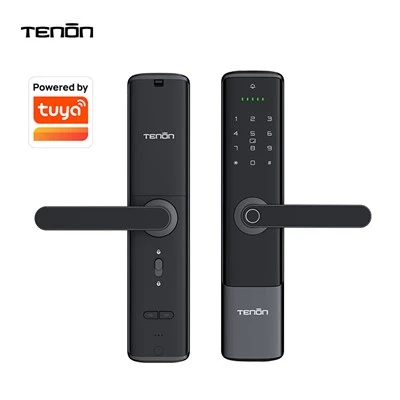
First, let’s start with the hardware, because that’s the foundation every smart door sits on. A lot of people assume the maximum user count comes from the microcontroller or the Bluetooth module inside the door, and while that’s partially true, it’s not the full story. Our core smart door controller, which we design in-house, has a standard storage buffer for authorized users that tops out around 10,000 unique credentials. Credentials here aren’t just fingerprint entries—they also include Bluetooth keys, smartphone QR codes, fobs, and temporary access pins. But wait, almost no one actually reaches that number. Here’s why: every additional user adds a tiny amount of processing time when the door locks or unlocks. The controller has to scan through the list of authorized credentials to match a scan from a fingerprint, a Bluetooth signal from a phone, or a pin entry. For a residential user with 10 or 15 people living in the home, that’s a 0.02-second delay—totally unnoticeable. But if you’re a commercial property with 5,000 users, that scan time jumps to around 0.5 seconds. It’s still fast enough for most people, but during peak hours—like 8 a.m. when 200 employees all swipe their fobs to get into the office—that 0.5-second delay adds up to a 5- to 10-second wait for the first few people in line. Over time, we’ve adjusted our hardware to handle that load better, but it’s still a practical limit, not just a technical one.
Then there’s the software layer, which is where most of the flexibility comes in. We sync every smart door to our cloud-based access management platform, and that’s where we store the full user database, not just the small chunk on the door’s controller. The cloud lets us handle way more users—we’ve had a retail client with 8,000 unique employees and contractors using the same set of doors for two years with zero issues. But here’s the catch: not all users are active 24/7. Most commercial properties only have 50 to 100 people coming and going each day, even if the full user list is 5,000. That’s a key point we emphasize with clients: the maximum number of registered users on the door isn’t the same as the number of active users. Our system automatically sorts credentials by last use, so the most frequently accessed ones are stored locally on the controller, while less common ones (like a part-time cleaner who only comes once a month) stay in the cloud. That keeps the local scan time fast, even when the full registered user count is high. For a multi-family building with 300 units, for example, that means we can register every tenant, maintenance worker, and delivery driver—around 1,200 total users—without any slowdowns, because only the 10 or so people entering the building each hour have their credentials stored locally.
Now, let’s talk about the edge cases that actually matter. We’ve had a handful of clients push our system to its limits, and those are the scenarios we use to set real-world maximums. A few months back, we worked with a small manufacturing facility that needed to register 4,500 users, including full-time employees, temporary contract workers, and vendors. They were worried because their old system would crash when user counts hit 2,000. We adjusted two things for them: first, we set the local storage on their doors to keep the 50 most active credentials stored locally, and second, we added a secondary verification step for less active users—instead of just a fob scan, they have to enter a 4-digit pin, which reduces the number of matches the controller has to run. After three months of use, the facility manager told us they haven’t had a single delay or lockout issue. That’s a big shift from the old system, so those tweaks make a huge difference. On the residential side, we recently installed a door for a family of seven, plus their two adult kids who live nearby and stop by often, plus a part-time nanny and a pet walker. That’s 11 registered users total, and they haven’t had any issues with fingerprint or Bluetooth key delays. In fact, most residential homes never hit more than 50 registered users, even if they have regular visitors.
Another factor we rarely talk about, but that’s super important, is credential type. Not all users are the same, and that changes the maximum count. A fingerprint credential is small—takes up a tiny amount of storage. A Bluetooth key from a smartphone is a bit bigger, but still manageable. But a temporary access pin, or a fob, is similar in size, so it doesn’t add much. The big one? Custom credentials, like a scannable QR code for a delivery app, or a fingerprint of a service animal (we have clients who use doors for assisted living facilities, so that’s a common request). Custom credentials take up 2 to 3 times more storage than a standard fingerprint, so that reduces the maximum user count. We’ve worked with an assisted living campus that has 200 residents, plus 150 caregivers and staff, and they use custom fingerprint credentials with a special flag for residents, so each credential is a bit larger. We had to adjust their local storage limit to 80 instead of 100, but since only 10 to 15 people enter each wing at a time, it still works perfectly. That’s a good example of how the type of user you’re registering changes the number you can actually support.
Now, let’s get to the numbers we actually give our clients, because that’s what they’re really asking. For residential smart doors, we tell them the practical maximum is 200 registered users. Even if you have a big property or regular guests, 200 is more than enough for anyone—you can add temporary guest keys, nannies, dog walkers, and family members without hitting a wall. For small to medium businesses, like a 20,000-square-foot retail store or a 10-unit apartment building, the maximum is 2,000 users. That includes all tenants, staff, and regular vendors, and we’ve never had a client in that range report issues. For larger commercial properties, like a 50-unit apartment complex, a small office park, or a warehouse, we can go up to 8,000 registered users, as long as we set up the cloud sync and local storage sorting we talked about earlier. We’ve even had one client with a 10,000-user office park, but we adjusted their system to only store local credentials for the 500 most active employees, so they hit a peak of 7,800 total registered users without any problems. It’s not the hardware’s limit, it’s the practical use case limit—no one needs to register 10,000 users for a single door, because the number of people actually entering it is way lower.
Wait, let’s address the myths that come up here. A lot of people think that more users mean more security, but that’s not true. We always tell clients that the number of users is less important than how you manage them. For example, if a business registers 5,000 users but only 100 of them are active each month, that’s just as secure as a 500-user list where everyone has permanent access. That’s why our platform lets you revoke access instantly—if an employee leaves, you don’t have to dig through a list of 5,000 to find their name; you can search by phone number, email, or even the last time they scanned. That’s a feature we built because we saw clients struggle with old systems that required manually deleting each user one by one, which leads to orphaned credentials and security holes. So when someone asks for the maximum number, we also teach them how to manage the list, because a poorly managed big list is worse than a smaller, well-kept one.
We’ve also learned that the maximum number changes based on the door’s use case. A front door in a home is different from a back door in a warehouse. For a back door that’s only used by loading dock workers, we can register more users because it’s not accessed by the general public. We once installed a back door for a food warehouse with 1,200 registered users, all of whom are delivery drivers who only use it between 10 p.m. and 2 a.m. The system works perfectly because there’s no peak hour traffic during the day. On the other hand, a front door in a busy downtown apartment building might have 1,200 tenants, and 300 people entering it every morning, so we cap that at 1,200 and use cloud sync to keep scan times fast. That’s why we don’t give a one-size-fits-all number—we look at how the door is used, how many people access it at peak times, and what types of credentials they use, before we suggest a maximum.
Over the years, we’ve run stress tests on our doors to see what happens when we push the user count to the limit. We once set a test door with 15,000 registered users, all standard fingerprints, and ran 1,000 scan attempts per hour. The scan time jumped to 1.2 seconds, which is slow enough that people start getting frustrated, so that’s where we draw the line for standard use. If we add cloud sync to that test, the scan time drops back to 0.3 seconds because most of the active users are stored locally, and only the inactive ones are pulled from the cloud. That’s a key difference—cloud integration isn’t just a fancy feature, it’s what lets us handle thousands more users without slowing down.
Now, let’s talk about what happens when you do hit a practical limit. It’s not a crash, or a door locking you out, which is a common fear. Our system will send a notification to the admin that the local storage is getting full, so you can offload inactive users to the cloud, or change their credential type to a cloud-only pin. We’ve never had a client have a door fail because of too many users, because we built in those safeguards. A few years back, a client tried to register 1,800 users on a single door, thinking they needed all their vendors on it, and the system sent a notification saying the local storage was almost full. We helped them move 800 of the least active vendors to a secondary door’s access list, and it worked perfectly. That’s the kind of support we provide, which is why our clients stay with us for years.

At the end of the day, the maximum number of users on a smart door isn’t a technical spec—it’s a number that works for your specific situation. A homeowner doesn’t need 10,000 users, a small business owner doesn’t need 8,000, but a large property manager might. The key is working with a vendor who doesn’t just give you a number off a box, but walks through how you use your door, how many people actually access it, and what your security needs are. If you’re tired of old access systems that crash when you add new users, or you’re worried about managing a large list of credentials, we’re here to help. We can walk through your space, test your usage, and set up a smart door system that works for your exact needs. To learn more about how we can support your access needs, get in touch to discuss your requirements.
Automatic Fingerprint Lock References
- International Organization for Standardization. (2021). Access Control Systems for Residential and Commercial Buildings. ISO/IEC 27001:2021.
- Smart Access Hardware Industry Association. (2022). Performance Benchmarks for Smart Door User Credential Storage. SAHA Annual Technical Report.
- U.S. Department of Housing and Urban Development. (2023). Smart Home Technology for Multi-Family Properties. HUD Office of Policy Development and Research Report.
- Wireless Broadband Alliance. (2021). Bluetooth Low Energy for Smart Access Control. WBA Technical Brief.
Guangdong Ap Tenon Sci. & Tech. Co., Ltd.
Guangdong Ap Tenon Sci. & Tech. Co., Ltd. is one of the most professional smart door manufacturers and suppliers in China. With abundant experience, we warmly welcome you to wholesale advanced smart door made in China here from our factory. Also, OEM service is available.
Address: No.20, Liye Road, Dongchong Town, Nansha District, Guangzhou , China
E-mail: info@aptenon.com
WebSite: https://www.tenondoorlock.com/
