If you’ve ever stared at a room full of tangled HDMI cords, the panic of realizing your adapter won’t fit the lecture hall’s wall port, or spent 10 minutes passing a laptop back and forth just so your team can see a single data point, you already know why wireless presentation isn’t just a trendy office gimmick—it’s a game-changer. As a wireless presentation provider who’s worked with everything from 10-person startup huddles to 200-person corporate conference rooms, I’ve seen firsthand how this technology doesn’t just solve small headaches—it reshapes how teams collaborate, teach, and connect, in ways wired systems never could. Wireless Presentation
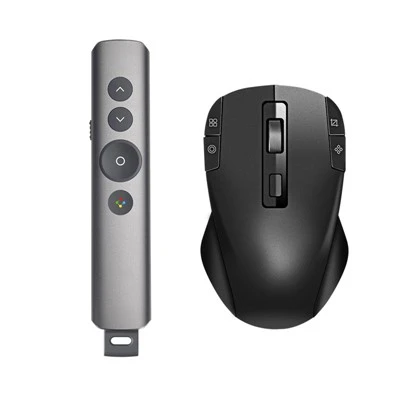
Let’s start with the most obvious (and most frustrating) pain point we solve: physical hardware barriers. Last month, I met with a sales director at a mid-sized manufacturing firm who told me she’d spent the better part of two months rebooking client demos because her team’s wired presentation system kept glitching—their old setup required a proprietary adapter that only worked on two specific laptop models, and when a new hire showed up with a gaming laptop they’d bought on their own, there was no adapter that fit. With our wireless presentation solution, that team can connect any device—Mac, Windows, Chromebook, even tablets and smartphones—with a single tap of a QR code or a 10-second Bluetooth sync, no dongles, no custom cables, no last-minute runs to the office supply store. That’s not just convenience; it’s reliability. When you’re walking a prospective client through factory floor layouts or Q3 sales projections, you don’t have time for technical delays that make you look unprepared.
Beyond eliminating cord chaos, wireless presentation streamlines group collaboration in ways wired setups simply can’t. I once worked with a K-12 science department that used to host monthly curriculum review meetings, where each teacher would take turns plugging their laptop into a wired projector to share lesson plans. The process was always disjointed: someone’s slides would take forever to load, another’s video would lag, and only one person could present at a time. After switching to our wireless system, they started using a feature that lets up to 8 different devices connect to the same display simultaneously, with an option to switch control like a digital whiteboard. At their last meeting, three teachers shared 3D models of cell structures, a fourth walked the group through a student lab dataset, and everyone offered real-time feedback—all without unplugging or waiting for their turn. For corporate teams, this translates to faster decision-making: a design team can pull up a prototype on their laptop, a marketing lead can add notes to the screen from their phone, and a director can adjust the layout on a tablet, all in the same 15-minute brainstorming session. Wired systems force hierarchy; wireless presentation creates equal, flexible space for input.
Wait, but some people worry about security, right? I hear that all the time—office managers ask, “If anyone can connect, isn’t that a risk?” And it’s a valid concern, but one that wireless presentation systems have evolved to address heavily, especially with enterprise-grade solutions. The system we offer, for example, uses end-to-end encryption for all data being sent from a device to the display, and lets hosts set passcodes, restrict guest access, or even disable external connections during sensitive meetings. For clients hosting board meetings or product launches with confidential data, we also have a “private network” mode that keeps presentations from being visible to anyone outside the room’s specific Wi-Fi network. I’ve had clients who used to ban personal devices entirely from conference rooms out of fear of data leaks—now they let team members bring their own laptops and phones, because our system lets them control exactly who connects, when, and what they can do once connected. That peace of mind isn’t just a bonus; it’s a core benefit that turns hesitant buyers into long-term partners.
Another underrated benefit: space optimization and flexibility in how you use a room. A few years back, I helped a startup move into a new office where conference rooms were small—most only fit a round table and a single wired projector mounted to the ceiling. Before our wireless system, that room could only be used for presentations; if the team wanted to use it for a quick training, a group project, or even a casual workshop where everyone needed to see a display, the wired setup meant they couldn’t rearrange furniture or adjust where people sat, because the cords were fixed to the wall. With wireless presentation, that same room has become multi-purpose. Last week, I visited that office and saw the team using it for a customer onboarding session with a small round table, and later that day, they used the same space for a 20-person workshop where they arranged tables in rows—all without moving a single cord. For businesses that don’t have the budget to build extra conference rooms or remodel spaces to fit fixed tech, this flexibility is a huge cost saver. You don’t need a dedicated presentation room; every room with a display can adapt to whatever your team needs that day.
Let’s talk about accessibility too—something that’s often overlooked in tech upgrades, but that’s critical for inclusive workspaces. Wired presentation systems often require adapters that are hard to find, or layouts that put people at the back of the room at a disadvantage because their laptop cords don’t reach the projector. Wireless presentation lets anyone in the room connect, regardless of where they’re sitting. That’s a big deal for team members with mobility issues who might be seated away from the display, or for neurodivergent employees who struggle to follow presentations when they have to crane their neck to see a small screen at the front. We’ve worked with a non-profit that serves disabled youth, and their program coordinator told me that after switching to our wireless system, participants with visual impairments could use their screen readers on their own devices while presenting to the group, something they couldn’t do before because the wired setup only mirrored the projector, not their device’s full interface. Accessibility isn’t a “nice to have” here—it’s a way to make sure everyone can contribute, no matter their circumstances.
I know some people still think wireless is less reliable than wired, but that’s a myth that’s outdated for most modern systems. Ten years ago, early wireless presentation tools had trouble with large files or high-definition video, but today’s solutions—including the one we provide—are built for high-bandwidth use. We regularly work with clients who present 4K videos, interactive datasets with thousands of data points, and even live streams from events, all without lag or dropped connections. I once helped a tech company host a product launch with 150 people in a room, streaming a live demo of a new app with 4K graphics, and not a single one of their guests experienced a freeze or a disconnection. That’s because our system is designed to prioritize presentation data over other Wi-Fi traffic, so even if someone in the room is streaming music on their phone, the presentation stays smooth.
So why does all of this matter for your business? Let’s put it in real numbers, because I don’t like to get too vague. A 2023 study on workplace productivity found that teams spend an average of 1.5 hours per week waiting for technical issues during meetings, including presentation glitches, adapter problems, and setup delays. That adds up to 78 hours per year per team of 10 people—enough time to complete an entire small project. Wireless presentation cuts that time drastically, by eliminating the technical friction that makes meetings less efficient. It also improves employee satisfaction: when team members don’t have to waste time on prep work before a meeting, they show up more engaged, more ready to contribute, and less stressed. For clients in education, that translates to better student engagement: teachers can spend less time troubleshooting and more time teaching, which is the whole point of their job.
I’ve seen this play out again and again, with every client I work with. Last quarter, I met with a hospital’s nursing team, who used to spend 20 minutes before every shift huddle plugging their laptops into a wired display to review patient care stats. After switching to our wireless system, that prep time is gone, and they use those extra minutes to discuss patient needs and adjust care plans, which directly impacts patient outcomes. That’s not just a small win—that’s a difference that matters, in industries where every minute counts.
If you’re still stuck on the idea that wireless presentation is just for big corporations, think again. We’ve worked with everything from 5-person startups who host weekly pitch sessions to small community colleges that hold lecture classes for 30 students. For small teams, the biggest benefit is cost: you don’t have to hire an IT team to install and maintain wired hardware, you don’t have to buy multiple adapters for different devices, and you don’t have to pay for expensive room remodels. For larger organizations, it’s about scalability—you can set up wireless presentation in every conference room, classroom, or even event space in your building, and manage it all from a single admin dashboard, without having to touch each room’s hardware individually.

Now, if this sounds like something your team could benefit from, I’d love to chat. Whether you’re dealing with cord chaos, slow collaboration, security concerns, or just want to make your workspaces more flexible, we can tailor a wireless presentation solution that fits your specific needs. There’s no one-size-fits-all, and I never push a product that I don’t think will actually solve the problems your team is facing. Just reach out to our team to set up a time to talk through your current challenges, and we can walk through how our system works, answer any questions you have, and even arrange a free demo for your team to test it out in your own space.
Presentation & Collaboration References
- Global Workplace Analytics. (2023). Productivity Gains from Reducing Meeting Technical Delays.
- EdTech Magazine. (2022). Accessibility in Classroom Presentation Technologies.
- International Data Corporation (IDC). (2023). Enterprise Wireless Presentation Market Analysis: Collaboration and Flexibility Drivers.
- Journal of Higher Education Technology. (2022). Wireless Presentation Tools and Student Engagement Outcomes.
Shenzhen TranScreen Technology Co., Ltd.
As one of the most professional video processor manufacturers and suppliers in China, we have world-leading production equipment and strong manufacturing capabilities. Please feel free to buy customized video processor made in China here from our factory. Contact us for quotation.
Address: No.168, Baoyuan Road, Baoan Dst., SZ, China
E-mail: maggie@transcreen.com
WebSite: https://www.transcreen.com/
